CS 491 Capstone Project — Spring 2026

Predicting Phishing Susceptibility in University Populations

A data-driven study analyzing how Bradley University students respond to simulated phishing attacks — and what we can all learn from it.

Project Overview

Our team designed and executed a controlled phishing campaign targeting Bradley University students to understand who is most vulnerable to social engineering attacks and why.

01

The Problem

Phishing simulations at universities are often limited to reactive training. There is little understanding of why certain users fall victim or how to proactively predict and mitigate risk.

02

Our Approach

We deployed a realistic phishing campaign using GoPhish, disguised as a "Late Night BU Online Raffle," alongside physical QR code posters placed across campus.

03

The Goal

Use statistical analysis and machine learning to identify demographic patterns in phishing susceptibility and build a predictive framework for future awareness campaigns.

Campaign Results

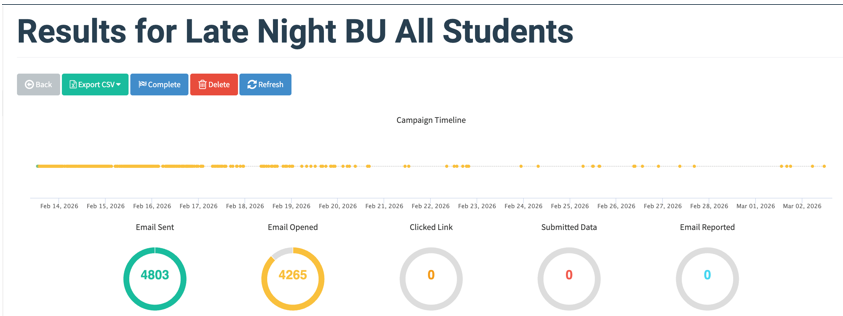
Our campaign was launched on February 13, 2026 and ran through the weekend until detection on February 16.

0
Emails Sent
Unique student inboxes targeted
0%
Open Rate
3,828 emails were opened
0
Form Submissions
Students who submitted personal info
0%
Submission Rate
Of all targeted students
0hrs
Time to Detection
Before the university responded
0
QR Posters Placed
Across major campus buildings

Campaign Evidence

GoPhish dashboard showing campaign results

GoPhish Dashboard — 4,803 emails sent, 4,265 opened
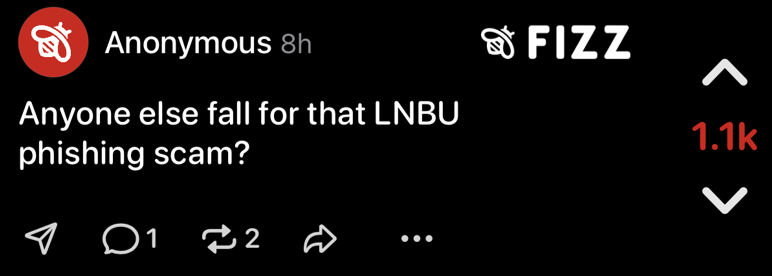
Student reaction on Fizz social media

Student reaction on Fizz (anonymous social media) — 1.1k upvotes
Key Findings

Statistical analysis revealed significant demographic patterns in who fell for the phishing campaign.

Gender & Susceptibility

Women were 1.64x more likely to submit information compared to men. The Chi-Square test confirmed a statistically significant association (p = 2.39 × 10⁻⁶).

Gender Clicked Didn't Click Total Click Rate
Female 262 1,684 1,946 13.46%
Male 162 1,708 1,870 8.66%
Total 424 3,392 3,816 11.11%

Area of Study

Students in Arts & Media were dramatically overrepresented among those who fell for the phishing email (std. residual +8.14), while Health Sciences students were significantly underrepresented (-2.54).

Arts & Media
+8.14
Engineering
+1.72
Education
+0.72
Data/Tech
-0.44
Social Sci
-1.10
Business
-1.82
Health Sci
-2.54

Standardized residuals by area of study. Values beyond ±1.96 indicate statistically significant over/underrepresentation.

Age & Phishing Susceptibility

Younger students (under 24) were significantly overrepresented among respondents, while older students (25+) were underrepresented. This indicates an inverse relationship between age and phishing susceptibility.

Age Group University Total Campaign Submissions Std. Residual
Under 18-19 1,261 137 +0.60
20-21 1,565 187 +2.00
22-24 616 86 +2.81
25-29 310 16 -2.83
30-34 137 3 -2.96
35-39 112 4 -2.22
40-49 162 3 -3.36
50-65+ 79 2 -2.16

Most Susceptible Profile

Younger female student enrolled in an Arts & Media discipline

Least Susceptible Profile

Older male student enrolled in Health Sciences

Machine Learning Analysis

We applied both supervised and unsupervised models to explore whether phishing susceptibility could be predicted from demographic data.

Supervised Models

Four supervised models were trained on demographic features (GPA, age, academic category) to predict submission behavior.

Logistic Regression

Binary classification using the logistic function to estimate submission probability.

Random Forest

Ensemble of decision trees aggregating predictions to reduce variance.

Decision Tree

Splits data using Gini impurity to classify submitters vs. non-submitters.

Linear Regression

Continuous prediction model applied to the binary outcome for comparison.

Random Forest
RandomForest Tree

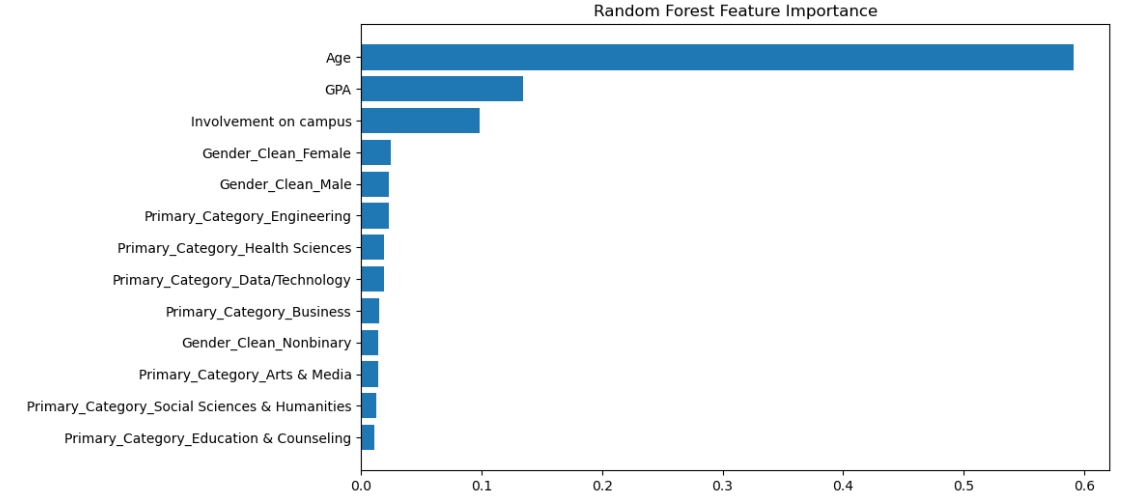
The Random Forest feature importance graph identifies the relative contribution of each feature to the model’s predictions. This helps reveal which variables have the most influence on decision-making and how they impact the model’s overall ranking and classification performance.

Decision Tree
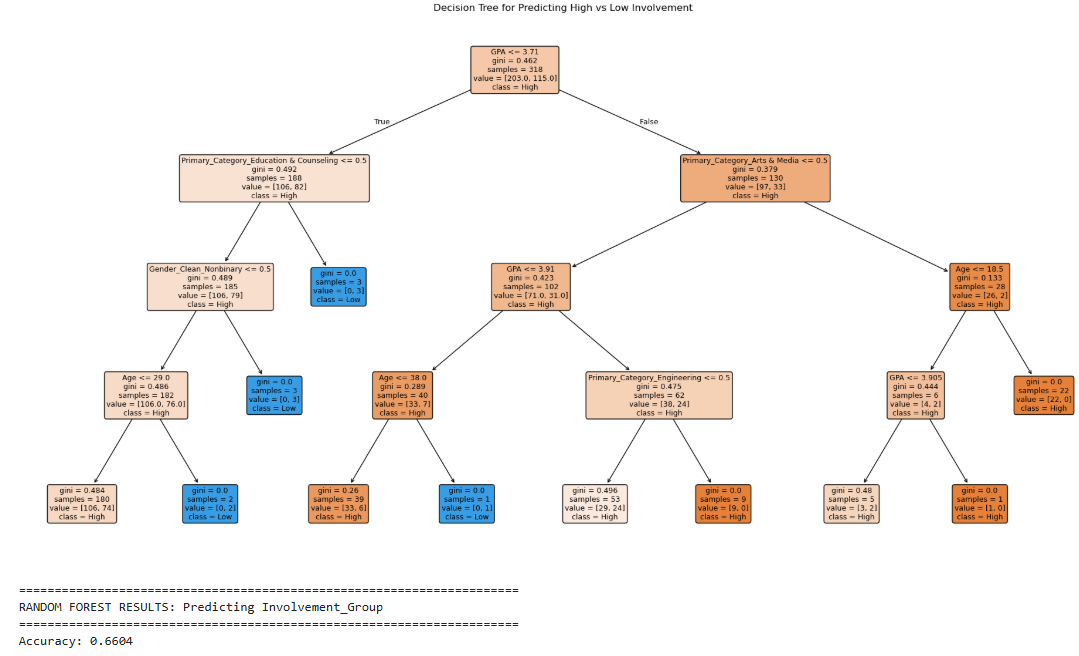
Involvement Tree

The decision tree shown a bove was built using only the submission data. After testing various feature combinations, the model achieved a reasonable and believable accuracy score. However, the results may be influenced by overfitting, as several leaf nodes contain a limited number of samples. Despite this limitation, the structure of the tree remains interpretable, allowing predictions to be clearly followed by tracing a sample through each decision path to its final classification.

K-Means Clustering

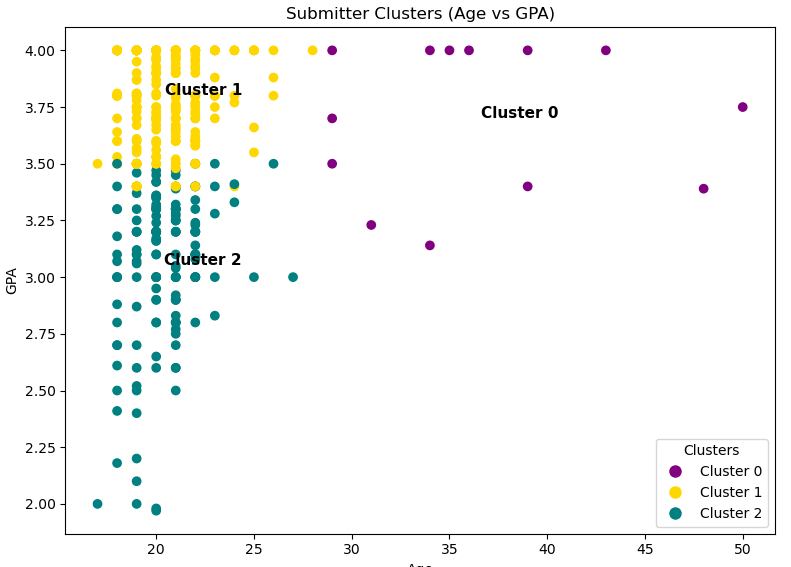
Since supervised models couldn't predict susceptibility, we used unsupervised K-Means clustering (K=3) to identify distinct demographic profiles within the submission population.

K-Means Cluster Chart
Cluster 0
13 submitters

Older students (mean age 35.6), higher GPA (mean 3.70). Top field: Education & Counseling.

Cluster 1
268 submitters

Traditional-age students (mean age 20.5), high GPA (mean 3.80). Top field: Engineering, Health Sciences.

Cluster 2
156 submitters

Traditional-age students (mean age 20.4), lower GPA (mean 3.10). Top field: Engineering, Health Sciences.

The clustering reveals that multiple distinct "types" of submitters exist, which can inform tailored phishing awareness strategies for different student groups. Demographics describe who fell for the campaign, even if they cannot predict who will.

Protect Yourself from Phishing

Our campaign proved that even tech-savvy university students can be fooled. Here's how to spot and avoid phishing attacks.

1

Check the Sender

Always verify the sender's email address carefully. Phishing emails often use addresses that look similar to legitimate ones but have subtle differences (e.g., bradIey.edu vs bradley.edu).

2

Hover Before You Click

Before clicking any link, hover over it to see the actual URL. If the destination doesn't match what you expect, or uses an unfamiliar domain, don't click it.

3

Beware of Urgency

Phishing emails create a false sense of urgency — deadlines, limited-time offers, or threats. Our campaign used a fake raffle with a deadline to pressure quick action.

4

Never Share Personal Info via Email

Legitimate organizations will never ask for sensitive information like your student ID, password, or SSN through email or an unfamiliar form.

5

Verify Through Official Channels

If an email claims to be from your university, go directly to the official website or call the office. Don't rely on links or phone numbers in the email itself.

6

Be Skeptical of "Free" Offers

Our phishing email promised free consoles and merch. If an offer seems too good to be true, it probably is. Verify giveaways through official university social media.

7

Watch for QR Codes Too

Phishing isn't just email. Our campaign used physical QR code posters on campus. Always check where a QR code leads before entering any information.

8

Report Suspicious Emails

If you receive a suspicious email, report it to your university's IT security office. At Bradley, contact the Office of Information Security. Reporting helps protect everyone.

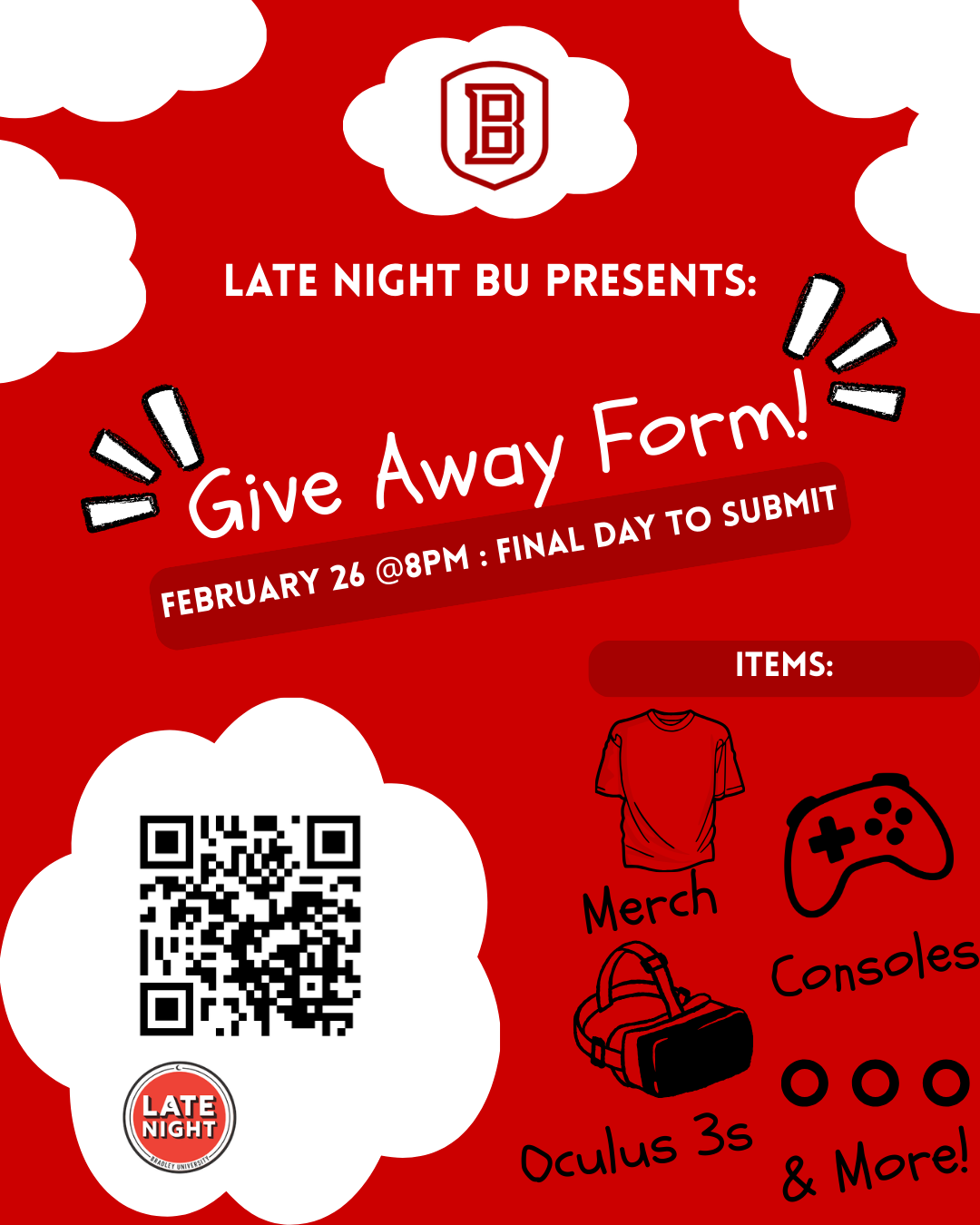
Late Night BU Giveaway Flyer - Phishing Poster

The Phishing Flyer

This poster was physically placed across 12 campus locations including all major academic buildings. It featured a QR code that directed students to the same fraudulent giveaway form used in the email campaign.

The flyer mimicked legitimate Bradley University branding and used the real "Late Night BU" event name to build trust and credibility.

Red Flags in Our Phishing Email

Here are the warning signs that were present in the "Late Night BU Online Raffle" email we sent:

  • Too-good-to-be-true prizes — Nintendo Switch, PS5, Oculus 3s, and more
  • Artificial deadline — "Submit before 8PM on February 26th"
  • Pressure language — "Don't wait until the last minute"
  • Unfamiliar link domain — The form link did not point to an official bradley.edu URL
  • Requests for sensitive data — The form asked for Bradley ID numbers, GPA, and personal details
  • No official verification — The event was not listed on any official Bradley University page

Campaign Timeline

Feb 6

Email Server Ready

GoPhish server deployed on Bradley's network with DKIM authentication configured.

Feb 13

Campaign Launched

4,803 phishing emails sent and QR code posters placed across 12 campus locations.

Feb 13-16

Data Collection

436 students submitted personal information through the fake giveaway form. 80% of all emails were opened.

Feb 16

Campaign Detected

A graduate student contacted Student Activities about the raffle, triggering internal escalation to university police.

Feb 16

Incident Response

Office of Information Security sent a warning to all students. Team disclosed the authorized security assessment. Situation resolved within ~72 hours.

Our Team

Bradley University — College of Liberal Arts & Sciences
Computer Science & Information Systems Department

TD

Professor Tony Du

Project Advisor

MC

Miguel Canelo

KT

Khoi Tran

JO

John Ocampo

JV

Joshua S Vogel

RB

Renée Bilsborough